Groups
Easily synonymous with teams, Groups are a collection of users. Groups define which pages
and actions a team can take (Menu and Endpoint Access); they also define default access for user created objects
(Default Model Access) and define the type of access along with the specific devices they may use
(Device RBAC Setup). RBAC is an acronym for Role Based Access Control.
Main Properties
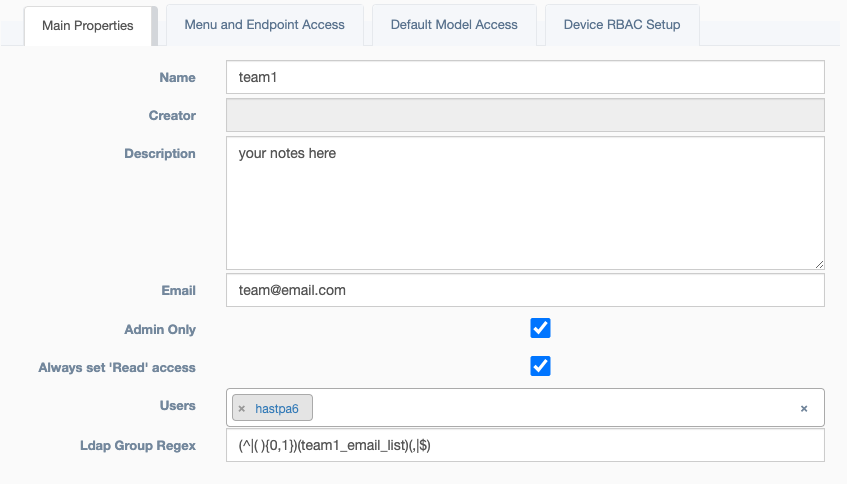
- Name: Unique identification for team name
- Creator: Auto Populated field based on the user who built the team
- Last Modified: The date and time when the object was last updated.
- Last Modified By: The user who last updated the object.
- Description: Text field for storing notes
- Email: Team email address
- Admin Only: An override of
Access Control, which prevents non-admin users from viewing or editing this object. - Always set 'Read' access: An override of
Access Control, which will make this team always have read level access to all services. This is helpful for admin likeGroupsto be able to support otherGroupshelp requests, by always granting view access. - Users: Members of this team
Menu and Endpoint Access
Fine control of actions a team can take.
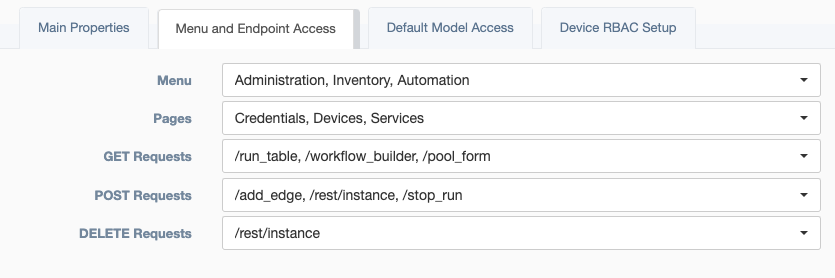
- Menu: Corresponding to the left sidebar, selections here define a base level of access.
- Pages: Defining the second level of access, this allows selection of sub-menus from
Menuabove. - Get Requests: Defining the third level of access, each request for data has a selectable endpoint.
- Post Requests: Further defining the third level of access, each request to modify or run has a selectable endpoint.
- Delete Requests: Further defining the third level of access, each request to remove objects has a selectable endpoint.
Default Model Access
Default access for user created objects.
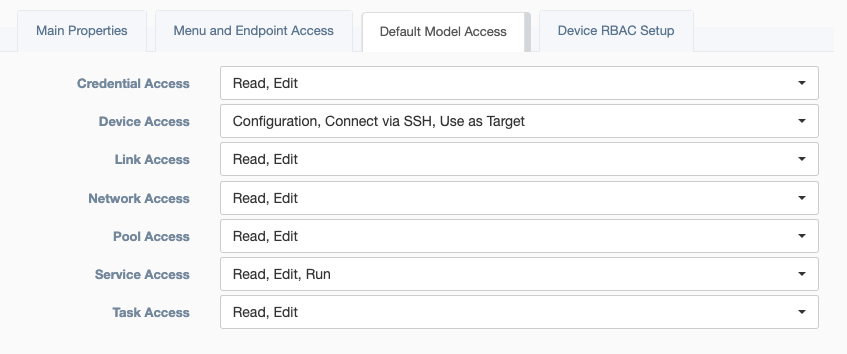
- Credential Access: Corresponding to the Access Control menu on a
Credentialobject. Options: Read/Edit. - Device Access: Corresponding to the Access Control menu on a
Credentialobject. Options: Read/Edit.- Read:
Groupsallowed to view this instance - Configuration:
Groupsallowed to view the configuration attribute of a device instance - Edit:
Groupsallowed to modify this instance - Connect via SSH:
Groupsallowed to use theConnectionor WebSSH feature found on the device table. - Use as Target:
Groupsallowed to use this device to run services.
- Read:
- Link Access: Corresponding to the Access Control menu on a
Linkobject. Options: Read/Edit. - Network Access: Corresponding to the Access Control menu on a
Networkobject. Options: Read/Edit. - Pool Access: Corresponding to the Access Control menu on a
Poolobject. Options: Read/Edit. - Service Access: Corresponding to the left sidebar, selections here define a base level of access. NOTE: User
must have Run Access to get results via API.
- Read:
Groupsallowed to view this instance - Edit:
Groupsallowed to modify this instance - Run:
Groupsallowed to use this service
- Read:
- Task Access: Corresponding to the Access Control menu on a
Taskobject. Options: Read/Edit.
Device RBAC Setup
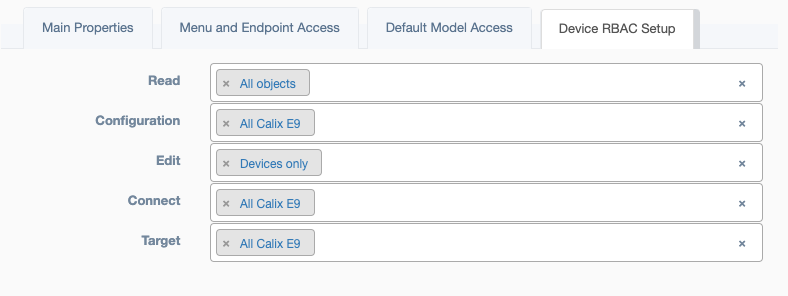
- Read: Select the pool of device objects this team may read.
- Configuration: Select the pool of device objects, where this team may read a device's 'Configuration` attribute.
- Edit: Select the pool of device objects this team may modify.
- Connect: Select the pool of device objects, where this team may use the
Connectionor WebSSH feature, found on the device table. - Target: Select the pool of device objects this team may use while running a service.
Advice
Each device can be operated on individually to update the RBAC settings. However, the top menu bar for Groups
has an icon that will Update Device RBAC from Pools. This feature uses the settings defined in Device RBAC Setup
and pushes those setting onto the appropriate devices.