Napalm Service Common Parameters
Napalm is an automation library written in Python that defines a standard set of APIs for interacting with Network Devices. These APIs include 'Getters' for retrieving operational data (show commands) from the devices and automatically parsing it into structured (dictionary) data, and the APIs include support for making config changes and performing is_alive, ping, and traceroute.
All the commands return structured data so that parsing is eliminated, and the base installation for Napalm includes support for Arista, Cisco IOS/XE/XR/XR_Netconf/NXOS, and Juniper devices. The Napalm Community repository here adds support for Mikrotik, Huawei, Nokia, Servertech, Metamako, Ruckus, ZPE, and PAN-OS devices as well.
These parameters are common to all Napalm Services.
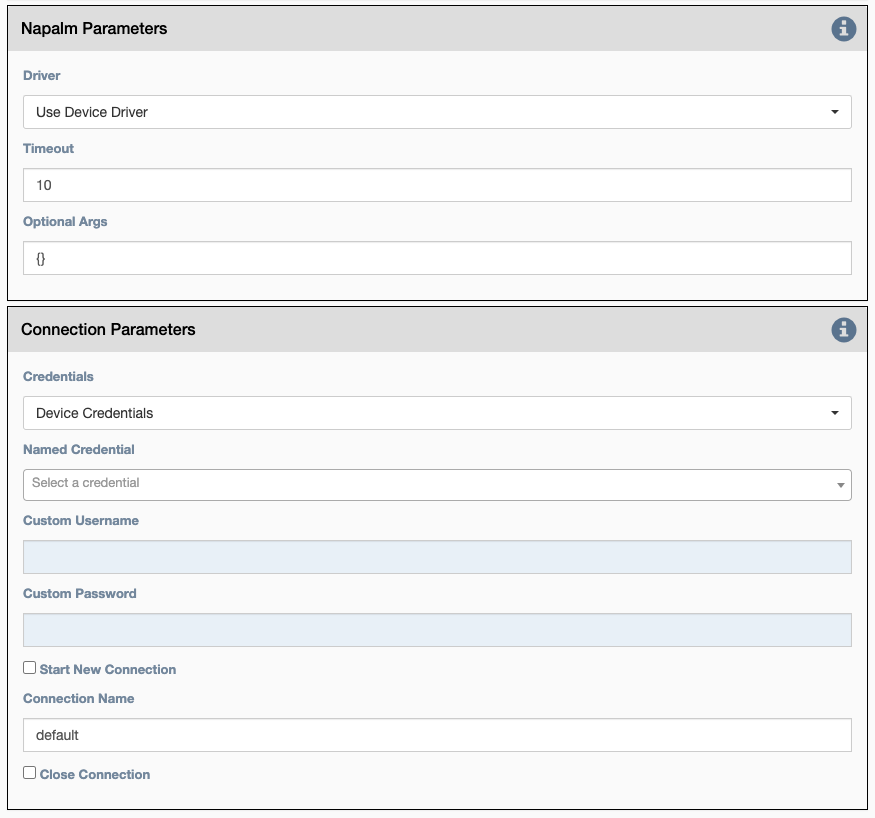
Napalm Parameters
Driver: Which Napalm driver to use when connecting to the device. IfUse Device Driveris chosen, the driver defined at device level (napalm_driverinventory property of the device) is used. Otherwise, the driver defined at service level (Driverproperty of the service) is used.Timeout: Used to set a non-default timeout for the device connection. A napalm service that does not successfully connect to the device within the timeout fails with status: results['success'] = FalseOptional arguments: Napalm supports a number of optional arguments that are documented here.
Connection Parameters
Credentials: Select between:Device Credentials: The application will select the most appropriate credential object for each device. If there are multiple credentials available, theType of CredentialandPriorityproperties become a tiebreaker.Named Credentials: Allows users to reference a specific credential for all targets. Selecting this option requires additional selections below (sectionNamed Credential).Custom Credentials: Allows users to store a credential against this service. Selecting this option requires additional selections below (sectionsCustom UsernameandCustom Password).
Advice
Named Credentials selections will persist through duplicating a service, unlike Custom Credentials.
For details on creating a Named Credential take a look at this page.
Named Credential: Select from a list of user created credential objects.Custom Username: User provided username, stored against this service.-
Custom Password: User provided password, stored against this service. -
Start New Connection: before the service runs, the current cached connection for the device is discarded, and a new one is started. -
Connection Name: If changed to something other thandefault, the connection will be cached as a separate connection to that same device. This allows for multiple simultaneous "named" connections to a single device. -
Close Connection: once the service is done running, the current connection will be closed.