Scrapli Common Parameters
These are the common Scrapli Parameters for Scrapli Commands and Scrapli Data Backup Services.
Scrapli Parameters
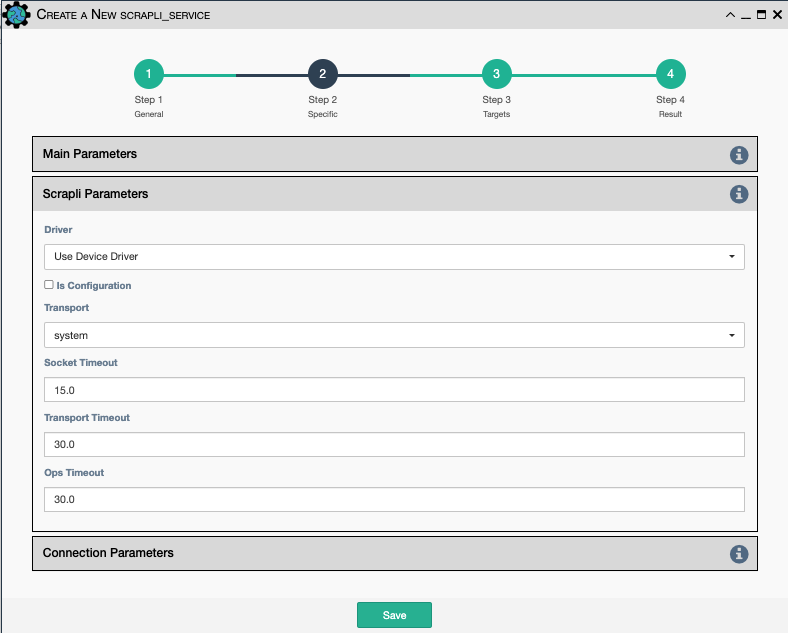
Driver: Scrapli driver to use. Currently, it supports:Device Driver: Use the driver assigned to the device in the application inventory- The base Scrapli installation comes with support for Arista, Cisco XE, XR and NXOS, and Juniper devices. Installing the optional Scrapli Community repository currently here adds support for Aethra, Alcatel, Aruba, additional Cisco, Cumulus, Datacom, Dell, Dlink, Edgecore, Eltex, Fortinet, HP, Huawei, Mikrotik, Nokia, Paloalto, Raisecom, Ruckus, Siemens, Versa, Vyos, and Zyxel/dslam devices.
Is Configuration: Should the device be put in config mode before issuing the commands?Transport: Supports using the following transport plugins:system: Wrapper around OpenSSH/System available SSH binary.paramiko: Wrapper around paramiko library.ssh2: Wrapper around ssh2-python library.
Socket Timeout: When the socket is created, it is initially set with this timeout.Transport Timeout: When system transport is selected, this is the timeout used. If ssh2 or paramiko are selected, the timeouts for each respective library is used.Ops Timeout: This timeout is used for individual operations (commands).
Connection Parameters
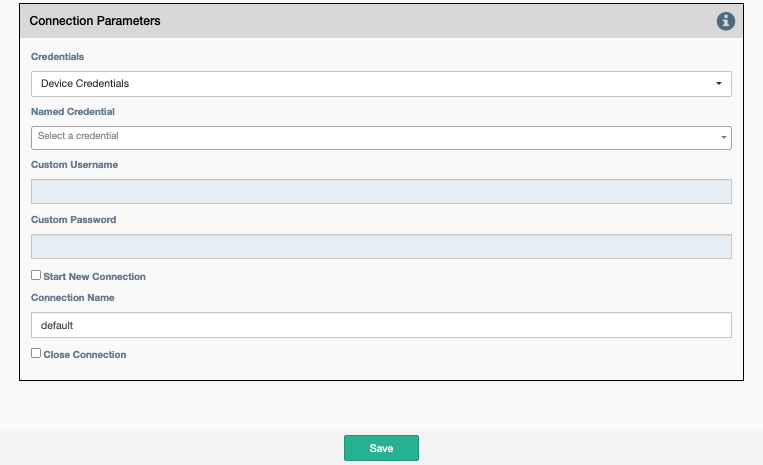
Credentials: Select between:Device Credentials: The application will select the most appropriate credential object for each device. If there are multiple credentials available, theType of CredentialandPriorityproperties become a tiebreaker.Named Credentials: Allows users to reference a specific credential for all targets. Selecting this option requires additional selections below.Custom Credentials: Allows users to store a credential against this service. Selecting this option requires additional selections below.
Advice
Named Credentials selections will persist through duplicating a service, unlike Custom Credentials.
For details on creating a Named Credential take a look at this page.
Named Credential: Select from a list of user created credential objects.Custom Username: User provided username, stored against this service.-
Custom Password: User provided password, stored against this service. -
Start New Connection: Before the service runs, the current cached connection is discarded and a new one is started. Connection Name: If changed to something other thandefault, the connection will be cached as a separate connection to that same device. This allows for multiple simultaneous "named" connections to a single device.Close Connection: Once the service is done running, the current connection will be closed.